
Jira app
JQL Stabilizer for Jira.
Keep Jira filters working when field names change.
The apps are awaiting Atlassian Marketplace approval. Release status
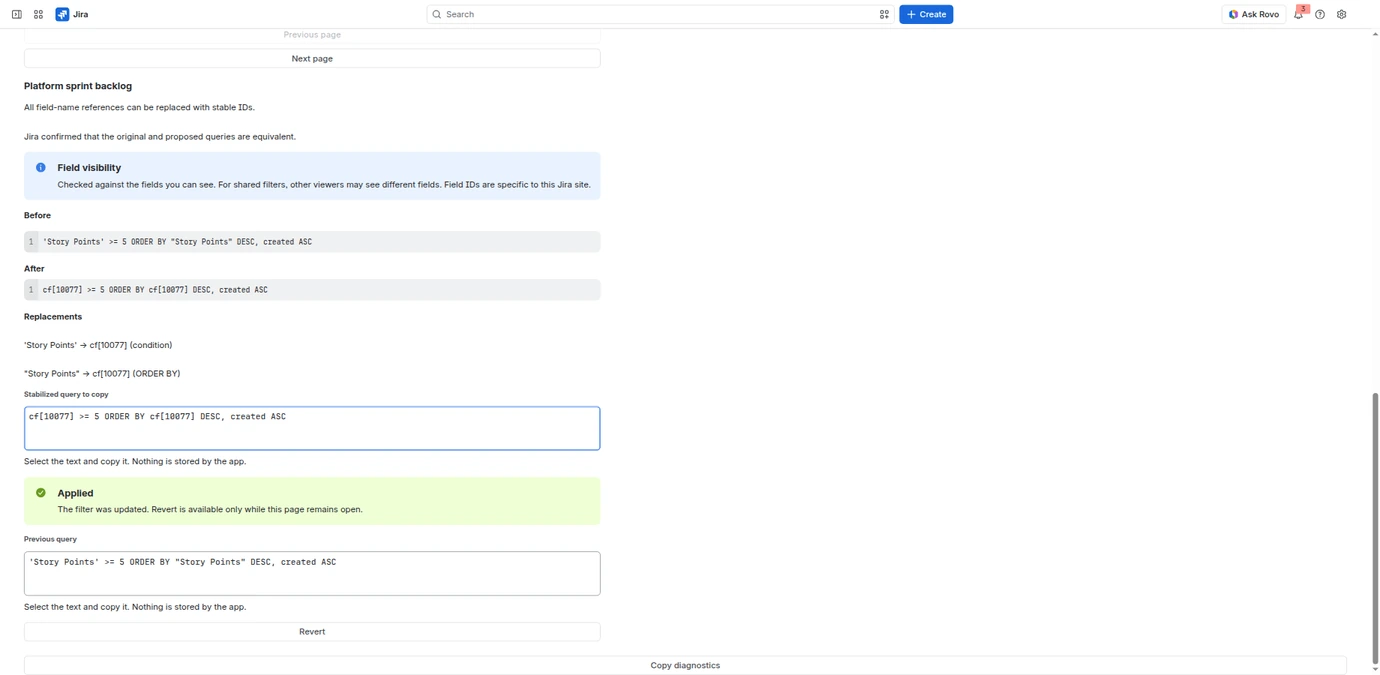 (view the screenshot at full size)
What it does
JQL Stabilizer checks whether a supported field name has one matching ID on your Jira site. Review the proposed replacements before applying them. Query values and the surrounding query text stay unchanged.
- Compare the original query with the proposed replacements. Jira checks that the two queries are equivalent before you can apply a change.
- Review and confirm each update to a filter you own with no other editors. You can also copy a checked proposal for manual use.
- Use Field impact to find visible filters that refer to a custom field. Pause, resume or cancel a scan without losing completed checks.
- Revert your own last verified update while the filter is unchanged and the tab stays open. Save the Previous query text before closing.
Who it is for
For filter owners who want their saved Jira filters to keep working when custom fields are renamed.
Before you start
- Other people’s filters are never changed.
- Updates remain saved in Jira after you close or uninstall the app.
- There are no automatic bulk updates or checks of dashboards, boards or Automation rules.
Monthly usage
Each site has a shared monthly allowance for opening the app, checking queries and saving verified updates.
Pricing
The prices below will apply after Marketplace approval. This page is not a purchase offer.
| Licensed Jira users | Monthly total (USD) |
|---|---|
| 10 | 0.00 |
| 50 | 15.00 |
| 100 | 30.00 |
| 500 | 69.50 |
| 1,000 | 109.50 |
Pricing is based on licensed users in the host product, not just people who open the app. The tier for up to 10 licensed users is free. Final monthly tiers and annual bands are governed by the published Atlassian Marketplace listing. See the Marketplace trial and refund conditions. No direct checkout is offered here.
Data and permissions
The app uses your Jira permissions. Queries, proposals and undo history are kept only in the open tab. It saves monthly usage totals without account IDs or query text. Confirmed Apply or Revert changes the saved filter in Jira. Support diagnostics contain only codes and counts.
The app does not keep customer queries or undo history after the tab closes. Saved filter changes stay in Jira and follow its platform policies.
User guide and support
Review the proposed replacements and Jira’s check, then confirm Apply for each eligible filter you own without other editors. Revert restores only your own last verified update while the same tab remains open and the filter is unchanged. Temporary read failures are retried automatically.
Read the JQL Stabilizer user guide. Marketplace publication and the installation link remain pending.